
Account access
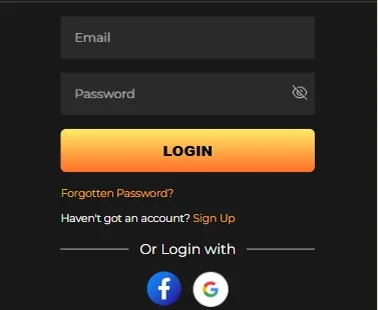
The sign-in form asks for two things: the email you registered with and your password. Everything else on this page exists for the times those two are not enough — a forgotten password, a locked account, a session that ended on its own.
ReefSpins Login Help: Signing In, And Fixing It When You Cannot
This page covers the ReefSpins login from both ends: the ordinary sign-in, and the fixes for when it fails. Jump to the heading that matches what is on your screen.
Signing in, step by step
- Open the site and select Login in the top bar. On a narrow screen it sits inside the menu icon.
- Enter the email address you registered with, then your password.
- Submit the form.
A successful sign-in returns you to the lobby with your balance in the header. No code, no second form, no waiting screen: if the balance is showing, the ReefSpins casino login worked.
The account is tied to the email address used at registration rather than to the device, so the same credentials work on a laptop, a tablet and a phone.
Logging in on a phone
The ReefSpins site behaves the same on a phone as on a desktop, because it is the same site. There is no ReefSpins app to install on iOS or Android, so nothing has to be downloaded first. Open the site in Safari or Chrome, tap the menu, tap Login, and enter the same email and password. Pokies, live dealer tables, the cashier and every account setting are available there; nothing is reserved for desktop.
Two notes for phone users. Private or incognito mode will not remember you between sessions, which is the mode working as intended. Saving the site to your home screen gives a one-tap shortcut that looks like an app icon, but the browser is still underneath it.










Something went wrong: find your symptom
Sign-in problems fall into four buckets, three of which you can clear yourself in a couple of minutes.
| What you are seeing | Where to go | Can you fix it yourself? |
|---|---|---|
| An error saying the email or password is incorrect | Section below on credential errors | Yes, in most cases |
| You cannot remember the password at all | Password reset section | Yes |
| A message that the account is locked or restricted | Locked accounts section | Partly; support finishes it |
| You were signed out on your own without touching anything | Unexpected logout section | Yes, usually nothing to fix |
ReefSpins support is the right call for a locked account or a verification question. For the rest, you will be back in faster on your own.
"Incorrect email or password"
This message is generic on purpose. For security reasons the site will not tell you which of the two fields was wrong, so work through both.
Check the obvious first. Caps Lock changes a password but not the email. A trailing space copied in with the password counts as a character. On a phone, autocapitalisation can turn the first letter of an email address into a capital.
Check which email you registered with. People sign up on a work address and try to log in months later on a personal one. Search both inboxes for the registration confirmation; whichever holds it is the right address.
Clear a stale autofill entry. If the browser is filling in a password saved before you changed it, it will keep resubmitting the old one. Delete both fields and type the values by hand.
If three careful manual attempts fail, reset the password rather than guessing again: repeated failures trigger a temporary lock.
Resetting a forgotten password
The reset flow is short.
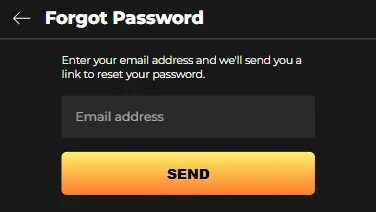
- On the ReefSpins login form, select Forgot password.
- Enter the email address registered to the account.
- Submit, then go to that inbox.
- Open the reset link and set a new password.
- Return to the login form and sign in with the new one.
On timing: the email normally arrives within a couple of minutes. If fifteen have passed with nothing, work through this list.
- Check the spam or junk folder. Automated mail from gambling and finance domains lands there routinely.
- Check the promotions or updates tab if you use Gmail's category tabs.
- Confirm the address you typed into the reset form; a typo sends the email nowhere useful.
- Use the resend option rather than requesting five resets in a row, because each new request can invalidate the previous link.
When an account is locked
A locked ReefSpins account is a routine safety measure, not a punishment, and it usually reverses quickly. Common triggers:
- Too many failed sign-in attempts. The most frequent cause, and often a temporary lock that clears itself.
- An unfamiliar location or device. Travel, a new phone or a VPN can look unusual to an automated check.
- Outstanding verification. Pending or unreadable identity documents can restrict access until they are resolved.
Do this in order. Wait rather than retrying, since more attempts extend a temporary lock. Reset the password, which clears the failed-attempt counter. If access is still blocked afterwards, contact support by live chat or email with your registered address and a plain description of what the screen says.
If the lock relates to verification, send exactly the documents requested, photographed with all four corners visible and no glare across the details. A rejected document is the biggest cause of a lock lasting longer than it needs to.
Signed out without doing anything
Being logged out unexpectedly looks alarming and almost never is. The usual explanations:
- Session timeout. Sessions end after inactivity. A lobby left open in a background tab overnight lands you on the login screen by morning.
- A new browser session. Clearing cookies, a browser update, or a setting that wipes site data on close all end the session, because login state lives in a cookie on your device.
- Signing in elsewhere. Opening the account on a second device can close the older session.
- Network change. Switching between mobile data and wi-fi mid-session can drop it.
The fix in every case is to sign in again: balance, history and any active bonus sit on the operator's servers, not in the browser session. Being signed out every few minutes on one device usually means a cookie-blocking setting or a privacy extension, so allow cookies for the site.
What keeps the account secure
A ReefSpins account is only as secure as the habits around it. Use a password that exists nowhere else, kept in a password manager. Never sign in through a link in an unexpected email or message; open the site yourself, because a convincing fake login page is easy to build and hard to spot in a hurry. On a shared computer, log out deliberately instead of closing the tab.
Keep the account email current, since it carries resets and account notices. Support handles access issues by live chat and email; no telephone line is published, so treat any call claiming to come from the casino as suspicious.
Ready when you are
Up to $1,000 in value across the first three deposits, with a 100% match up to $300 on the first one. A $20 deposit switches the offer on, and the package stays optional — a clean, immediately withdrawable balance is a perfectly reasonable choice.
- Balances in Australian dollars, US dollars or cryptocurrency
- PayID and Instant Bank Transfer at the cashier, withdrawals from $10
- Bonus play runs on pokies and slots, jackpot games excluded
Login FAQ
Usually a couple of minutes. If fifteen pass with nothing, check the spam folder and category tabs, confirm the address you entered, then use the resend option rather than requesting several resets.
The message covers both fields deliberately. Usual causes: Caps Lock, a space copied in with the password, autocapitalisation of the email on a phone, an outdated browser autofill entry, or a different address than the one used at sign-up. Type both values manually before assuming the account is at fault.
Stop retrying, since further attempts can extend a temporary lock, then reset your password to clear the failed-attempt counter. If access is still blocked, contact support by live chat or email with your registered address. Locks tied to verification clear once the requested documents are supplied.
No. ReefSpins has no native iOS or Android app. Open the site in your mobile browser and sign in with the same credentials; the lobby, cashier and account settings are all available there.
Sessions end after inactivity, when cookies are cleared, when you sign in on another device, or when your connection changes. That is standard security behaviour, not a compromised account. Sign in again and your balance and history will be as you left them.